Even minutes, worked out before the game.
Benchcard is a free substitution planner for youth and rec basketball. Give it your roster and say how the minutes should be split, and it works out who is on the floor for every stint — then prints it on a card that fits in your pocket.
The problem it solves
You have eleven kids and a thirty-two minute game. Five are on the floor at a time, which is forty player-slots to hand out, which does not divide by eleven. Somebody is getting more and somebody is getting less, and the parents in the third row are counting.
Most coaches do this in the car, on the back of the schedule, five minutes before tip-off — and then lose track by the third quarter, because a substitution plan is not a thing you can hold in your head while also coaching. Benchcard does the arithmetic once, honestly, and hands you a piece of paper that tells you what to do at every whistle.
How it works
- Put in your roster. One player per line, jersey numbers optional. Paste it from wherever it lives, or photograph the team sheet and let Benchcard read it — the photo never leaves the phone.
- Say how long the game is. Periods, minutes per period, and how often you want to substitute. Four eight-minute quarters with a change every four minutes is the common one.
- Choose how the minutes get split — see the four plans below — and add any rules you need.
- Print the card. Pocket size for a notebook, half-sheet if you carry a clipboard. Cut on the dashed line.
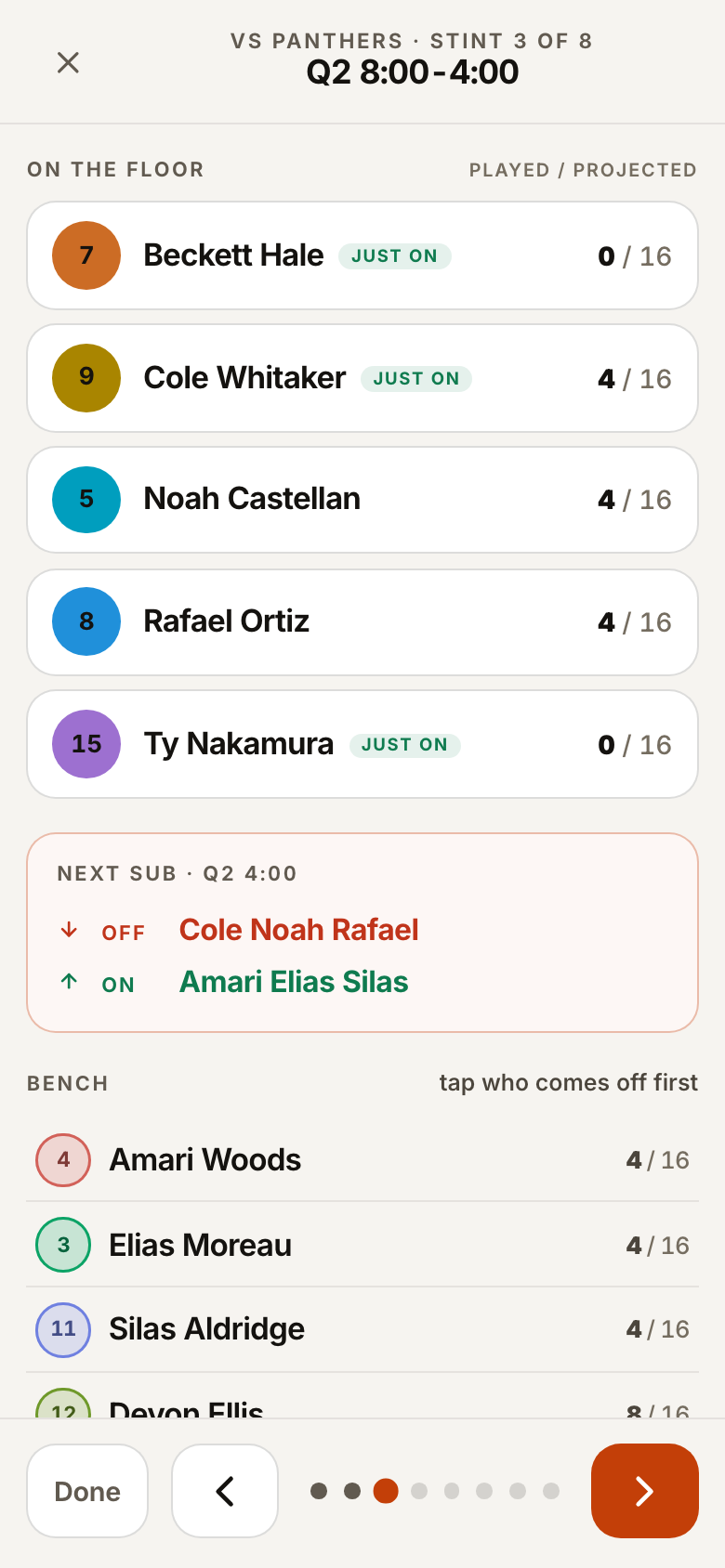
- Run the game off it. The card is enough on its own; if you would rather use the phone, bench mode shows the next substitution in large type and lets you swap someone on the fly.
The four ways to split a game
Balanced
Everybody plays as close to the same number of minutes as the clock allows. This is what most rec and youth leagues expect, and it is the right answer if you are not sure.
Minutes
You set each player's total yourself and the plan hits it. Useful when somebody has to leave early, is easing back from an injury, or a parent has asked for something specific. The totals always add up to the whole game, so giving one player more takes it from the others — in front of you, rather than by accident.
Closers
Even minutes for most of the game, then a group you pick stays on to finish. For the games that are allowed to matter.
Platoon
Two or three fixed fives that swap as whole units. The easiest thing to run from the bench and good for the youngest ages — but the minutes only come out even if the groups themselves are even.
Rules the plan works around
Rules are things that have to be true; everything else bends around them.
- Minutes limit — a floor, a ceiling, or both, for one player. “At least 10” guarantees floor time; “capped at 12” holds somebody back.
- Starting five and last period — who is out there at tip-off, and who finishes.
- Play together / keep apart — a pair that works, or two who need separating. “Together” is a preference the plan maximises by default; you can make it a hard requirement, at a cost in evenness.
- Rest limit — the most stints anyone may play back to back, so nobody is left out there for a whole half.
A tournament day
Add a second game and it copies the format, who is at the gym and your rules — only the opponent and tip-off are new. From there the day balances across every game by default, so a player who sat more in game one gets it back in game two. Turn that off and each game is fair on its own. A running total shows where everyone stands.
Reading the card
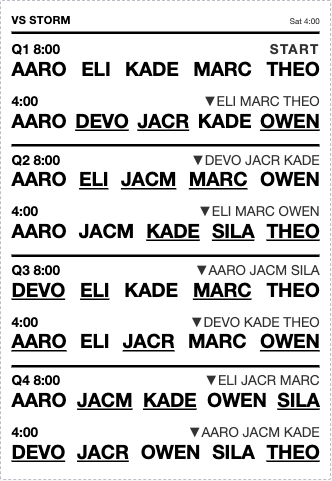
Each block is one substitution. On the left is the clock — Q2 8:00 means with eight minutes left in the second period. To its right, ▼ lists who is coming off. Underneath are the five who are on the floor for that stretch, and the underlined names are the ones who just came on. START is your opening five; NO SUBS means nobody changes at that break.
Your roster and your players never leave your device. Benchcard runs entirely in your browser. Your roster, your games and your rules are stored on the device you typed them into — there is no account and no server holding your team, which also means clearing your browser data clears it. The site counts anonymous usage (page views, and which features get used) so it is possible to tell what is worth building next; those are counters only, never a name, a team or an opponent.
Questions
- How do you give every player equal playing time?
- Stop thinking in players and think in stints. A 4 × 8 game with a change every four minutes is eight stints of five, which is forty player-slots. Eleven players share forty slots, so each gets three or four — dead-even is arithmetically impossible, and the real job is spreading the remainder fairly and remembering who was short last time. That is the part a phone is better at than a parent under pressure.
- Is it free?
- Yes, and there is no account. I write software for a living and coach a sixth-grade team, and working the minutes out was the part I dreaded — a spreadsheet I kept rebuilding, or twenty minutes with a pen before every game. I wanted something that just did it, so I built one. If it is useful to you too, there is a tip link here and in the app.
- Does it work at the gym with no signal?
- Yes. Once the page has loaded it needs no network, and you can add it to your home screen so it opens like an app. The card is on paper anyway.
- What if somebody shows up late or leaves early?
- Mark who is actually at the gym before you build the plan, or give that player a minutes ceiling. Mid-game, bench mode lets you swap anybody and re-checks the stints that are left.
- Does it work for other sports?
- The scheduling works for any sport with a fixed number on the floor and a running clock — the problem is the same one. What is basketball is the vocabulary, the card layout and the defaults: five on the floor, four periods, eight minutes each.
- How many players does it need?
- Five or more. Below five there is nothing to plan; above about fifteen the minutes get thin enough that you will want minute floors rather than a pure even split.